

Search article

ALL
Update Plans for the Second Half of 2020
Greetings, Saviors. This is Tree of Savior Developer Team. We would like to share the Update Plans for the Second Half of 2020. 1. Solo Raid List of Additional Solo Legend Raid - Legend Lepidoptera Junction Normal - Legend Lepidoptera Junction Hard - Unique White Witch’s Forest Like traditional casual raids, the main reward items(ex; Unique Glacia equipment, Moringponia Talc Powder) are the same, but the best of luck rewards(ex; a Finished product of Karaliene Accessory) that can only be obtained in the party version is excluded. Casual Raids can only be cleared in solo and can accompany 1 assister. It provides a separate entrance count from the party raids and the weekly count is unsettled. 2. Solo Challenge Mode with the Assisters A solo version of Challenge mode that allows the player to fight alongside 4 Assisters will be added. The structure is equal to the original Challenge Mode but can be played by 1 player and 4 assisters. The performance of the monsters in Challenge Mode and the Assisters will be adjusted to the content. Although the types of rewards are the same, silver and item drop probability will be 70% of the party challenge. We are currently developing the content to be played in a variety of ways such as holding the monsters with Tank or Holding character and giving damage with the Assisters, supporting the Assisters in battle with a support or Healer character, or dealing by yourself with a healing Assister. 3. Balance Change Balance Patch will resume. In the balance patch later this year, skill factor and structure of some classes including Mergen, Fletcher, Ranger, Highlander, Fencer, Matador, Cryomancer, Chaplain, and Monk will be adjusted. The following lineup which requires more developing period and resources are: reorganizing Nak Muay and settling the builds of Swordsman class strike attack classes, reorganizing Psychokinesis, Earth, and Non-property classes of Wizard class especially Psychokinos, reorganizing Sadhu of Cleric class, and 2 new classes. These are currently planned for updates at the end of this year. We are aware of the classes that need attention but as there are limits in reorganizing them by simply adjusting the skill factor, we ask for a kind understanding that more developing/test period is needed. The order or the reorganized class may be changed according to the development situation. 4. Changes in reward from normal Field/Hunting Grounds At the moment, the major contents of Tree of Savior are challenge and raids, which has a limit in playing or requires a separate item to play. Contents that does not have a limit in playing as much as the time allows are the normal fields and the Hunting Ground and compared to other contents that have limitations or costs in use, these contents are vulnerable to automatic hunting programs or the production of goods by extreme hard-playing users(24-hour full play), widening the gap with ordinary users. Silver is the most effective and most influential commodity produced in the field and free dungeon, and users who play the content on a 24-hour hardcore can earn up to 24 times more silver than users who play it for one hour a day. This difference creates a huge gap than any other limited content. Therefore, the development team is planning to change the silver drop from high-level fields and Hunting Ground to the corresponding number of mercenary badges, and to remove and supplement silver drop from the low-level fields (areas growing up) with episode clear rewards or quest rewards. As this is a significant change, we are informing you in advance through this developer’s blog and will apply it in the patch as soon as possible so please take note. Other than this, the new boss will be added in Hunting Grounds, and Field Boss event, Gemstone Feud, Team Battle League will be reorganized. Update of a new boss monster in Guild Battle and reorganization in GTW for this is planned. Details of each content will be posted after the update is ready. ※ Contents, values, and attached materials described in this posting may be added, deleted, or changed when applying to the live server.
Sunfish Attacks!
Greetings, Saviors! Tree of Savior is under attack! Sunfishes are terrorizing the Kingdom’s citizens. Protect them by defeating the sunfishes and claim your reward. Event Period FROM the scheduled maintenance of June 4, 2019 TO the scheduled maintenance of June 25, 2019 Who Can Participate - This event is open to players of all levels How to Participate - Hit a Little Sunfish at least once when they appear. - Defeat all 50 Little Sunfishes that appear in the various event areas with everyone. - Sunfishes will appear daily on the following schedule: Time Weekdays Weekends 13:00 - Channels 1, 2 and 3 16:00 - Channels 1, 2 and 3 19:00 - Channels 1, 2 and 3 20:00 Channels 1 and 2 X 22:00 Channels 1 and 2 Channels 1, 2 and 3 * Sunfishes will respawn after the channel reboots if a channel crashes during the event. You can proceed with the event normally after the channel has rebooted then claim your reward. Event Areas, NPC's and Treasure Chest Locations - When 50 Little Sunfishes have been defeated, an Event NPC and a Treasure Chest will appear. - There are different NPC’s for each location and channel. - The Event NPC and Treasure Chest will be removed 30 minutes after they are spawned. Rewards [Sunfish Power] Buff - Physical ATK +200 - Magic ATK +200 - Movement Speed +5 - Looting Chance +1000 - Applied to all players 30 minutes after the Sunfishes have spawned and lasts for 1 hour. - The buff will only be available in general field areas (Instance Dungeons, Missions and PvP areas are excluded). Attribute Points: 100 (14 Days) x2 - Item cannot be traded or transferred via Team Storage. - All players who have hit a Little Sunfish at least once will be eligible to receive the reward. - This reward will be available only after all 50 Little Sunfishes have been defeated. - You can visit any of the Event NPC's in all areas that you've hit a Little Sunfish to claim your reward. - You will only be able to receive this reward once when having hit Little Sunfishes on different channels in a single area. Treasure Chest - You must first gain permission from the Event NPC before you can open a Treasure Chest. - You can gain permission to open a chest even if you have not hit a Sunfish at least once. - Treasure Chests will appear when all 50 Little Sunfishes are defeated in an event area. - A total of 100 Treasure Chests will spawn in the event area after all 50 Little Sunfishes have been defeated. - Treasure Chests can be opened once per character per event time slot. - Unopened Treasure Chests will be removed 30 minutes after they are spawned. - Right-click the Treasure Chest to obtain one of the following items at random: Item Number Team Storage Trade Raid Portal Stone 2 O O Goddess’ Blessed Shard 3 O O Challenge Mode One Entry Voucher (14 Days) 1 X X Enchant Scroll 2 O O [Lv. 400] [Event] Unique Enchant Jewel 1 O X

[UPDATE] [Special] Lucky Shard Package
Greetings, Saviors! Test your luck with our new Lucky Shard Package available at our TP Shop! Read on below for details. Sale Period FROM the scheduled maintenance on June 18, 2019 TO the scheduled maintenance on July 16, 2019 Lucky Shard Package x3 7 TP - No purchase limit per Character or per Team - Each Lucky Shard Package contains a Feeling Lucky Package x1 and a Blessed Shard x1 - Open the Feeling Lucky Package to obtain one of the following items at random: Important - [UPDATE] The current edition of the Lucky Shard package will only be available until the end of the sale period on July 16, 2019. So don't forget to open the cubes before the event period ends! - The Blessed Shard contained in the Lucky Shard Package can be traded via the Market or between and can be transferred via Team Storage. - Lucky Shard Package and the Feeling Lucky package cannot be personally traded or sold over the Market and cannot be transferred via Team Storage.
The Lore You Know: Plague Doctor
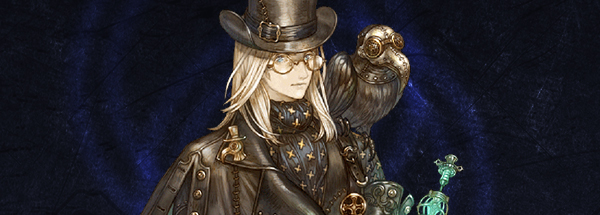
Today we will dive into the history that inspired our Cleric Rank 7 Class and Class Master, the Plague Doctor. Although, I have a feeling many of you are already familiar with its history. The iconic image and role of the Plague Doctors came about due to the Black Death. The Black Death was a bubonic plague that arrived in Europe by sea in 1347 and over the next five years killed more than 20 million people in Europe alone. Now, keep in mind that the Black Death struck during Medieval Times where medical knowledge was limited and the people, highly superstitious. When the Black Death swept across Europe like a curse with seemingly no rational explanation, the people turned to the only ones willing to “treat” the disease – Plague Doctors. Plague Doctors were hired by towns and villages (not by individuals) to treat those affected by the Black Death. But the word “treat” can be used loosely here since it’s debatable whether the majority of Plague Doctors were helping keep the plague at bay or were increasing the rate at which it spread. Regardless, Plague Doctors had an array of treatments they used to offer medical care based on the Medieval medical practicie of the four bodily fluids. Doctors during this time believed that the human body needed a balance between blood, mucus, yellow bile, and black bile in order for the person to be considered healthy. This is why an infamous treatment of the Plague Doctor was Bloodletting. Besides treating the infected, Plague Doctors also recorded the number of deaths and took part in autopsies. Their easily identifiable costume was also a reflection of their role in society. As they were to be the closest to the diseased they had to prevent themselves from being infected as well. Their outfit was originally created by Charles de l’Orme in the 17th century and consisted of a leather hat, a beak-like mask with red glass eyes, a black overcoat, leather breeches, and to top it all off, a wooden cane. The “beak” of the mask was filled with drugs and strong smelling items to cover the scent of death. The Plague Doctors also believed that this protected them from the “bad air” of the plague. The leather hat was a symbol for 14th Century doctors and many believed the hat could shield doctors from bacteria. The black overcoat and leather breeches were to minimize skin exposure, while the wooden cane was a way for the doctors to examine patients and move bodies without direct contact. However, despite their costumes, the doctors were not immune to the plague and many of them fell ill or were ultimately quarantined. So now, if we take a look at our own Plague Doctor, we can see reflections of this history in their skills and class outfit – although our doctors are a bit more fashionable than the ones from history and a little less worried about minimizing skin exposure. And let’s keep in mind that the Plague Doctors of history did not purposefully pass on Black Death or other diseases to their enemies. In this case we wouldn’t want art to imitate life. References Dugan, B., 2013. Anatomy of 14th Century Bubonic Plague Hazmat Suits. [Online] History, 2010. Black Death. [Online] Medieval Medicine. The Humors. [Online] Plague Doctor Masks, 2017. History of Black Death. [Online] Sartore, M. 13 Horrifying Things Most People Don't Know About Plague Doctors. [Online]
[UPDATE] Scheduled Maintenance for June 12, 2018
Greetings, Saviors!We would like to announce the details of our weekly maintenance for (June 12, 2018). Make sure to check below for the maintenance schedule and patch notes.Please note that other issues and bugs are also being worked on even if they are not mentioned below.
Scheduled Maintenance for May 19, 2020
Greetings, Saviors!We would like to announce the details of our weekly maintenance for (May 19, 2020). Make sure to check below for the maintenance schedule and patch notes.Please note that other issues and bugs are also being worked on even if they are not mentioned below.
Known Issues: July 27th
Greetings, Saviors. The following is the list of bugs or issues that we are aware and currently working on them. GENERAL Controller Mode Info In Korean: “Ancient Korean secret, huh” The info window for Controller Mode is in Korean. Dropped FPS After the Patch: “Za Warudo” Frame rate issues after the patch in certain situations. Connection Issues After the Patch: “Notorious I.P.F.” Game crashing after the patch. A friendly reminder: Please, try to log in after uninstalling any and all add-ons. If the problem persists please let us know via Support Ticket. Mouse Mode Issues : “Mouse Infestation” Certain skills not working properly in a mouse mode. SKILL & STAT Barbarian – Cleave: “Cleave to Leave” The skill crashing the game when used. Swordsman STR Not Increasing Block Penetration: “0% Penetration 100% Frustration” Despite the recent patch note, Swordsman’s STR stat not increasing Block Penetration. Please let us know via Support Ticket if you are experiencing other problems. When reporting issues, please be as detailed as possible. Screenshots, character/Team/server/class details, and timestamps would be greatly appreciated. That way we can have more information to work with on a more specified problem allowing it to be resolved faster.

[UPDATE] [IMPORTANT] Server Merge – What to Prepare
Greetings, Saviors. As you may know, we are preparing to merge game servers in the regions of North America (Klaipeda + Orsha) and Southeast Asia (Telsiai + Varena) on March 13, 2018. Details about the merge and how it can affect your teams have been previously announced through the First Notice (click here), so make sure to read it if you need more information. For now, we would like to remind you of a few things you may need to prepare ahead of the merge. 1. Main Team - If you have a team in both servers of the same region, one of the teams will be automatically selected as your main team based on the following criteria: 1st priority) Highest total of EXP (sum of all characters in team [EDIT] excluding Companions) 2nd priority) Largest number of characters in team - You can expect most data from your main team to remain unaltered after the merge, but you may lose some data from your secondary team. - Make sure to read our First Notice (click here) and understand how each aspect of your main and secondary teams will be affected by the merge. 2. Character Slots - If you have a team in both servers of your region, your Lodge in the merged server will consist of 4 basic character slots, plus any premium slots you may have purchased (sum of both teams). For example, if you purchased 1 slot in server A and 2 slots in server B, your total in the merged server will be 4 basic slots + 1 premium slot + 2 premium slots = 7 character slots. - Excess characters will not be allowed (this depends on your total of character slots available). In order to keep all your characters, you may have to purchase additional slots or delete unwanted characters before the merge. - After the merge, you will be given an additional period of 2 weeks to purchase additional slots or rearrange and delete unwanted characters. After this 2-week period, your characters’ items will be automatically sent to their corresponding Market Retrieve tabs and you will not be able to login until your excess characters are deleted. 3. Market - During the merge, all items you have registered for sale will be automatically canceled and sent to the corresponding character’s Market Retrieve tab. - The registration fee of items canceled automatically during the merge will not be refunded. If you want to avoid losing the Silver spent on your registration fees, please refrain from registering items in the Market right before the merge. 4. Character Names - If two characters in your merged team have the same name, the second character will automatically be renamed “Charactername_1”. - To address this, all players in the [NA] and [SEA] region will be able to change the name of their characters for 1TP for a set period after the merge (details will be announced later).
Scheduled Maintenance for June 23, 2020
Greetings, Saviors!We would like to announce the details of our weekly maintenance for (June 23, 2020). Make sure to check below for the maintenance schedule and patch notes.Please note that other issues and bugs are also being worked on even if they are not mentioned below.